Lesson 1: Introduction Excel VBA Macro Programming
Continue learning classic Excel VBA with the same shared lesson template and cleaner visual style.
1.1 Introduction to Excel VBA
Visual Basic for Applications (VBA) is a powerful tool built into Microsoft Excel that allows you to automate tasks, create custom functions, and develop sophisticated applications within your spreadsheets.
1.2 Getting Started with VBA
- Open the VBA Editor
- Write Your First Macro
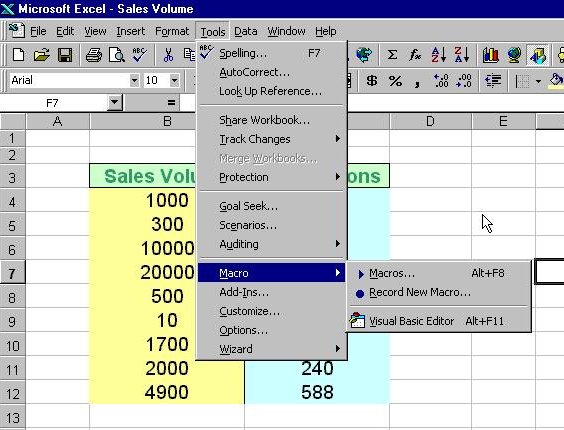
There are two ways to create an Excel VBA macro. The first is to place a command button on the MS Excel spreadsheet and click on the button to enter the VBA Editor. The second is to launch the Visual Basic Editor from the menu. To launch the VBE, click on tools on the menu bar and select macro and then click on Visual Basic Editor.
1.2.1 Creating Excel VBA Using the Command Button
To create an Excel VBA using the command button, you need to place the command button on the spreadsheet. In order to access the command button, you need to click View on the MS Excel menu bar and then click on the toolbar and select the Control Toolbox to launch the control toolbox, as shown in Figure 1.1 .The control toolbox comprises various controls, as shown in Figure 1.2. Select the command button and place it on the spreadsheet.


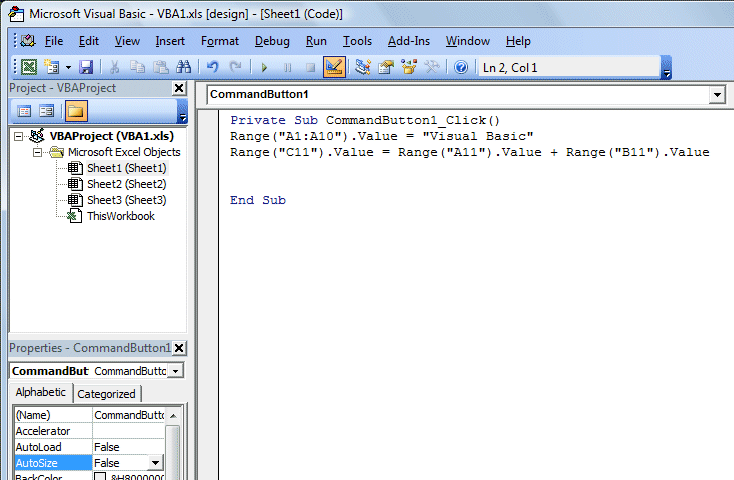
Next, you click on the command button and the Visual Basic Editor will appear.Enter the statement as shown in the Figure 1.3. The first statement will fill up cell A1 to cell A10 with the phrase "Visual Basic" while the second statement add the value in cell A11 and cell B11 and then show the sum in cell C11. The output is shown in Figure 1.4.

1.2.2 Creating Excel VBA in Visual Basic Editor
To launch the VBE, click on tools on the menu bar and select macro and then click on Visual Basic Editor,as shown in Figure 1.5. The Visual Basic Editor code window is shown in Figure 1.6. You can create a VBA function in the VBE. We will learn about function in later lesson.

Related Resources
- Full Excel VBA Tutorial Index
- Excel VBA Examples
- Excel VBA for Microsoft Office 365
- Visual Basic Tutorial