Lesson 12 Looping
Continue learning Excel VBA 2010 with the same shared lesson template and cleaner visual style.
Excel 2010 VBA allows a procedure to repeat many times until a condition is met. This is called looping. There are three kinds of loops, the For…….Next loop, the While….Wend loop and the Do...Loop.
12.1 One level For...Next Loop
The one level For….Next Loop event procedure is written as follows:
For counter=startNumber to endNumber (Step increment)
 One or more VB statements
Next
Example 12.1
In this Excel 2010 VBA program, you place the command button on the spreadsheet then click on it to go into the Excel 2010 VBA editor. When you click on the button, the Excel VBA program will fill cells(1,1) with the value of 1, cells(2,1) with the value of 2, cells(3,1) with the value of 3……until cells (10,1) with the value of 10. The position of each cell in the Excel spreadsheet is referenced with cells(i,j), where i represents a row and j represent a column. We shall learn more about cells in future lessons.
Private Sub CommandButton1_Click()
Dim i As Integer
For i = 1 To 10
 Cells(i, 1).Value = i
 Cells(i,2).Value=i^2
Next
End Sub

Example 12.2
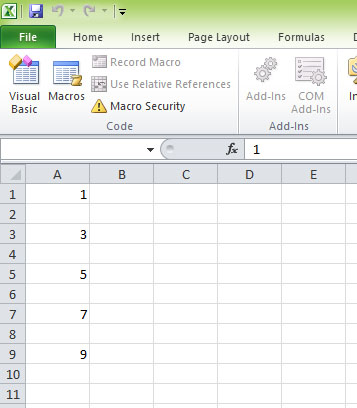
For...Next loop with step increments. In this example, the number increases by 2 at a time. The resulting series is 1,3,5,7,9 displayed in Cells(1,1), Cells(3,1),Cells(5,1), Cells(7,1) and Cells(9,1) respectively.
Private Sub CommandButton1_Click()
Dim i As Integer
For i = 1 To 10  Step 2
 Cells(i, 1).Value = i
Next
End Sub
12.2 Nested For...Next Loop
Nested For...Next loops mean there more than one For…Next Loops are nested within the first level For…..Next loop. The structure is as follows:
For counter=startNumber1 to endNumber1
For counter=startNumber2 to endNumber2
For counter=startNumber3 to endNumber3
 One or more VB statements
Next
Next
Next
Example 12.3
In this example , we use nested loop to insert the values of i+j from cells(1,1),cells(1,2),cells(1,3),cells(1,4),cells(1,5) ……….until cells(10,5).
Private Sub CommandButton1_Click()
Dim i, j As Integer
For i = 1 To 10
For j = 1 To 5
 Cells(i, j).Value = i + j
Next
Next
End Sub

12.3 While….Wend Loop
The structure of a While….Wend Loop is very similar to the Do Loop. it takes the following form:
While condition
 Statements
Wend
The above loop means that while the condition is not met, the loop will go on. The loop will end when the condition is met. Let’s examine the program listed in example 12.4.
Example 12.4
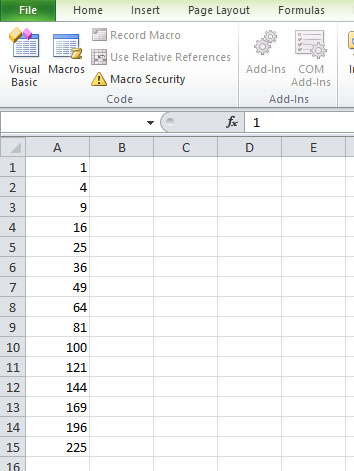
In this example, the Excel VBA program will compute the square of numbers from 1 to 15 and displays them from Cells(1,1) to Cells(15,1)
Private Sub CommandButton1_Click()
Dim i As Integer
i = 1
While i <= 15
 Cells(i, 1) = i ^ 2
 i = i + 1
Wend
End Sub